Friday, November 26, 2010

Family Portrait Posing Tips

Are you thinking of sending family portraits to friends and family during the holiday season? If so, I have a few tips to help keep those photos looking fresh and unique from year to year.

1. Keep your poses interesting and different. Look at last year portraits and change up the posing somewhat. Change the arrangement, positioning and colors of the photos. The key is each subject should flatter the other while maintaining a sense of family between them.

2. If you take photos outdoors, ensure the scene compliments you. For instance overcast skies tend to make objects appear flat and lifeless. Do not pick an area that has a lot of background traffic.

3. Ensure all head wear such as Santa caps are not covering the eyes or creating a shadow across the face.

4. Lighting - hair lights do not work well with people that are balding. If you must use the hair light with people that are balding then plan some extra time so you can move the lights around so the reflections are not beaming into the camera.

5. Do not make family portraits a chore. Capturing unique and dynamic family portraits should be fun.


Friday, November 19, 2010

PhotoEditorX Review

Photo Editor X Photo Editing Software Banner

PhotoEditorX is a very complete software that can be used to edit photos in a very professional way. It's very easy to learn how to handle it and with this software you'll be able to edit your photos to become as good as the photos you see in magazines. This is a great system that will help you create perfect pictures from scratch and you don't need any photo editing skills to use this software.

This software has a bunch of appealing features and it will take you plenty of time to explore them all. The program makes it possible for you to try image manipulation, simple rezising of your images and many other things and all the features are very useful whether you want to use this for private purpose or in your business.

The greatest thing of all regarding PhotoEditorX is that it's perfectly suitable for professionals as well as beginners. Everyone can use this and get satisfied when they see the results. It's not exactly a low budget alternative since it's better than many expensive alternatives, but it is a cheap alternative with high quality.

Thousands of people use this software on a daily basis, some of them work with it to edit pictures for magazines and newspapers. The results that you get are always amazing and there are simple guidelines to follow in case you don't understand how to edit your files.

I think this software is totally fantastic and some things make this software exceptional. These four features are the ones that is most appealing according to me:

· You get the same features as you get when you use PhotoShop but this software is a lot easier to learn how to handle and you will get this photo suite a lot cheaper than if you decide to buy PhotoShop.

· You will get the same program that most publishers use and you don't need to have any particular education or experience to be able to get as good results as the publishers.

· You will get a chance to restore old photos and this is amazing since you'll be able to keep all your old memories for centuries, which would be impossible without this software.

· You can change the background and remove all unwanted things that shouldn't be there.

These are only a few of the available features and you will probably find your own favorites as soon as you start using PhotoEditorX. The possibility to change colors, add frames, make teeth white and many other things are amazing and you won't want to work without this software once you've tried it.

There are plenty of reasons why you should choose this software and here are a few.

Budget – You'll save plenty of money by choosing PhotoEditorX as it's quite cheap and very cost-worthy.

Results – You'll get better results than you could ever hope for with any other software.

Friday, October 22, 2010

The Image Doctors #127

An interesting touch of info I thought I would share with you.

The Image Doctors #127: "Jason and Rick are back from their Moab photo safari. This week the doctors discuss Nik Software's new HDR Efex Pro plug-in with product manager Josh Haftel, and Jason has a hands-on report of the new Coolpix P7000.

Download The Image Doctors #127 (MP4 format)

"

Saturday, October 16, 2010

Help Your Photos Pop

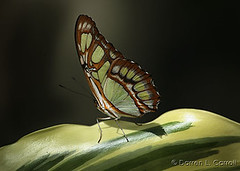
ButterflyAre your photos falling short in the pop department? One of the most over looked compositional elements can be to blame, Bokeh. Simply put bokeh is a technique where the photographer throws the background out of focus, creating a soft blend of the background objects.

So, what does throwing the background out of focus do? When the subject is sharp and the background is blurred the subject tends to stand off from the background. Almost like a 3D object. Therefore, your subject is more likely to pop out at the viewers. In the photo of the butterfly the foliage in the background is blurred to allow the viewer to see the butterfly with out distraction.

Throwing the background out of focus is not always as easy as it seems. Bokeh does have quality and quantity levels that make the blurring effect good and bad. Yes, you heard correctly there is good bokeh and bad bokeh. Without going into great detail, I am going to say that the blur should be smooth, blending the objects and lights evenly. Bokeh that creates shapes are not the most pleasing to view. To do this, we generally use a shallow depth of field, keeping the subject in sharp focus and the background out of focus.

Steps to Creating Good Bokeh

  1. Equipment: A camera that allows you to control the aperture settings will be needed. A DSLR or SLR is preferred. If you have a camera in the point and shoot category check for an A/V or Portrait setting, either of these will usually work.
  2. Turn off any and all flash units. Flash is not good for boken.
  3. The objective is to get a shallow depth of field, which can be achieved in several ways. The shallow depth of field will throw objects behind the subject out of focus and hopefully creating a nice smooth bokeh. I prefer the A/V setting to be in the area or 4.0 if possible, 5.6 at the highest f/stop and 2.8 at the lowest f/stop. If your camera does not have the A/V setting, try the portrait setting. Generally speaking it does not work as well as the A/V setting. If all else fails, move your subject away from the background (more than a few feet).
  4. Focus on the subject and click.

You can bring your photos back to life and make them pop with just a little good bokeh. Try it, I know you will like the results.

"D"

Saturday, October 9, 2010

Captured: America in Color from 1939-1943 – Plog Photo Blog

I came across this collection of photos and thought they are worth the sharing. This is a must see collection of photos.

Captured: America in Color from 1939-1943 – Plog Photo Blog

Powered by Blogger.
Twitter Delicious Facebook Digg Stumbleupon Favorites More

 
Design by Free WordPress Themes | Bloggerized by Lasantha - Premium Blogger Themes | Design Blog, Make Online Money